
Looking for a qualitative analysis tool that can save you from all the headaches?
Try Notion

Yes, you heard it right.
Notion – the tool that helps manage literally everything in your life: track new habits, oversee the workflow, capture notes, document the progress, etc. This tool can also save you from feeling overwhelmed, lost, and frustrated, typical emotions you experience in qualitative analysis.
Indeed, I wonder if the Notion people considered data analysis, particularly qualitative analysis, when they positioned their platform as "all-in-one workspace". Given the pricing of high-end qualitative analysis software such as NVivo or Atlas.ti and the bulkiness of Excel as well as its lack of automation, when you choose to stay with a low-cost solution, I wholeheartedly believe that Notion will be a game changer for your academic life.
It can do pretty much what NVivo or Atlas.ti offer you.
Its Plus plan which offers more teamwork features is free for academia.
Plus, it is truly "all-in-one workspace," where you can also track the work progress and manage other logistic details. More on this topic will need to wait for a later post. For today's, let's focus on how Notion can help you conduct qualitative analysis with rigor and save you from all the hassles.

What exactly do we need from a qualitative analysis tool?
To better understand how Notion can help you, let’s take a moment and think about what we really need from a qualitative analysis tool.
Let's say you conduct a systematic literature review, a project that often involves a great deal of content analysis. The first tool that comes to your mind might be Excel. Everybody uses it. There's no learning curve nor bad surprises when you collaborate with others.
Except one thing: No matter how you want to treat extracted text data, you have to do it manually.
Excel is made to work with numbers, not text. If you put a lot of text there, you'll lead yourself to paralysis mode, unable to function afterward.
To use Excel for the content analysis of a systematic literature review, one possible simple workflow would be:
1. Annotate articles in Zotero
2. Tag extracts with codes
3. Put codes in Excel.
With one article having multiple codes, you have to create multiple columns to hold codes to make things readable. This solution is workable when your data pool is small, and you have a well-defined code structure. The story changes dramatically once you have dozens of articles, and need to revise your code structure several times.
Excel has automation functions as mentioned in one of my previous articles on using Excel's Table format for literature review. But the automation in Excel only works with number data.
In a systematic literature review, we need to work with loads of text. And text data requires different operations.
Specifically, to analyze the content of the articles selected for the review means to bring out their connections, how the articles converge in one aspect and diverge from the other in another. For rigor and trustworthiness of the analysis, we want to be able to trace back what is said in one article and validate if it does refer to whatever code we assign to it.
It means…
We want to be able to an extract to the article that contains it.
We also want to be able to assign a code to this extract, and make sure that this code shows up in the article in question.
If we change our mind about a code, say, modify its wording to better capture the meaning of content, we want this change to be synchronized across the whole dataset.
In short, we want the functions of a qualitative analysis software like NVivo. Better if it is user-friendly and doesn't cost an arm and a leg.
Well, if that’s what you’re looking for, you are in the right place. Welcome to the wonderland of Notion!
Here is what Notion can offer you:
1. Link extracts to articles, codes and categories & automate data connections
With a good Notion database setup, you can easily link extracts to articles, modify the code assigned to extracts, and see changes synchronized everywhere.
Notion’s database function and its two properties "Relations" and "Rollups" are essential for this setup. One of Notion’s most powerful and flexible features, databases enable you to create structured collections of information. For your literature review project, you might want to create the following databases:
1. Article database to hold information of all articles selected for your review
2. Extract database to store relevant extracts from the selected articles, including associated themes as indicated in the original articles
3. Code database to store codes, sub-codes, and carry out your analysis work.
To establish connections between these databases, you will need to set up "Relations" and "Rollups" properties. While the "Relations" property allows you to link items like extracts from the Extract database to articles in the Article database and to codes in the Code database, "Rollups" helps aggregate, for example, Codes assigned to Extracts in the Article database.
That means, when you go to a specific article, you not only see all its extracted data, but you'll also see all the codes linked to these extracts. Equally, when you modify the wording of a code, this change will show up automatically in the Extract view and Article view.
Want to read more about these properties and see how they work? You can have a look at Notion’s website.
2. Obtain dynamic views of data in a couple of clicks
While Notion databases come with multiple views, enabling you to look at your data from various angles, I find the kanban board view is the most important display that we should care about when conducting qualitative analysis.
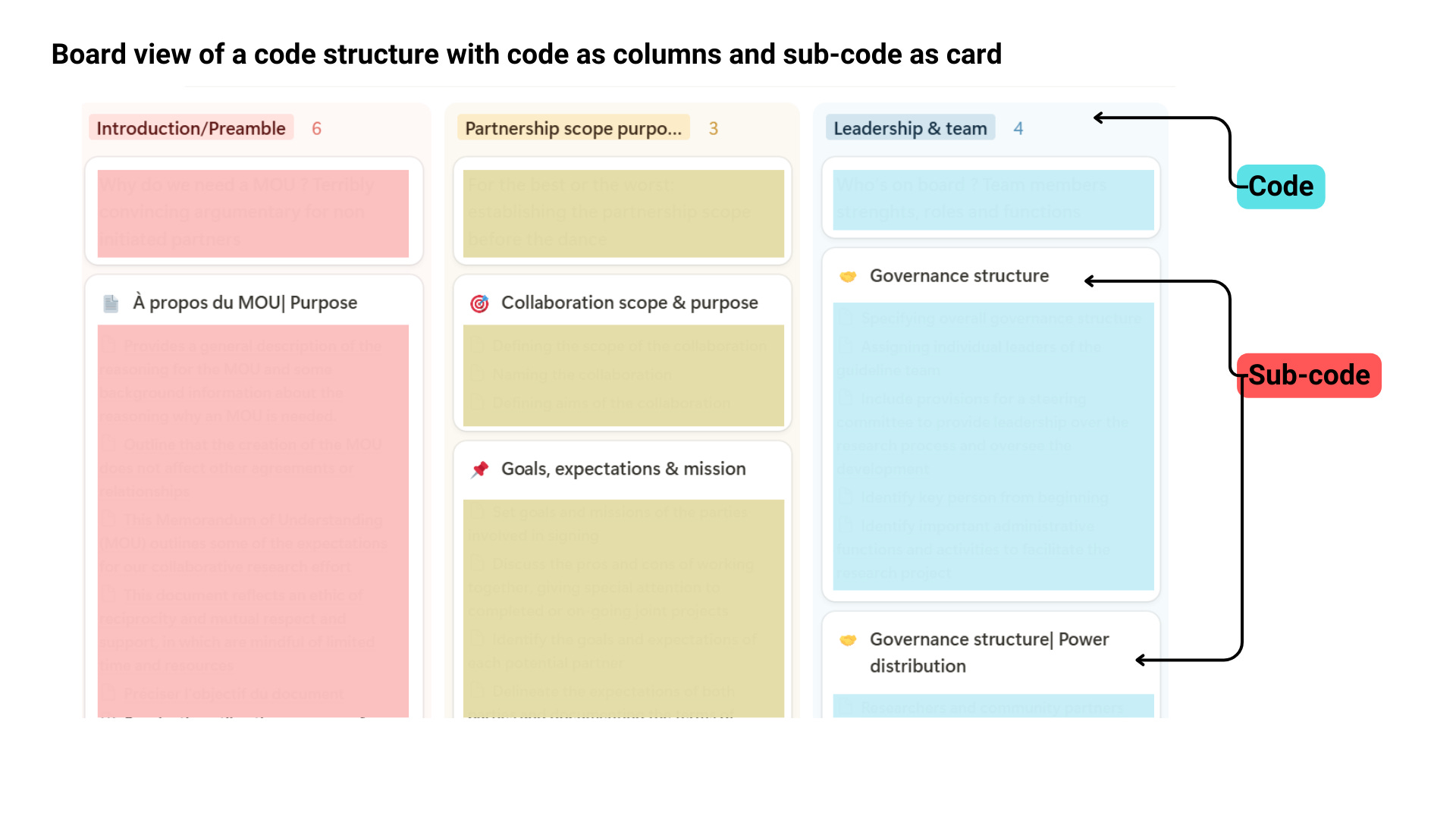
Organizing data items into columns with each entry as a card, the board display helps visualize your code structure in a dynamic way.
Let's say, you have a two-level code tree made up of codes and sub-codes.
With a board view that groups sub-codes by codes, you can see what sub-codes make up a specific code. Furthermore, since all the databases are linked together, with one click you can show what extracts from which articles were assigned to those codes and sub-codes.
One image is worth a thousand words. Here is how a board view of codes and sub-codes looks like.
3. Work and share findings with others at ease
My clients might be in a better position to tell you what they think when I share the work progress and the preliminary findings of our literature review project using Notion databases. But I can at least tell you what I felt.
It's not the first time I've needed to share my analysis with someone to get their input. But it's the first time I've felt relieved.
I didn't bombard my clients with bulky data that would require them hours to navigate through.
Myself neither. I didn't need to spend hours tearing my hairs out for a convivial way to share data with them.
With a couple of clicks, I can change the view of the database setup that I've used for data analysis. And voila, I have a clean board view to present to my clients.
That’s it, my friends. That’s Notion’s wonderland. I’m still amazed with all what I can do with this single tool.
And let’s not forget: Notion is free.
Use it.
Optimize it.
Make your life easier with it.